Upload a video and edit it with Happyhorse 1.0
Upload your video, describe your edits, and let Happyhorse 1.0 adjust people, products, scenes, motion, style, and details for a quick new video version.
Upload a video, describe the change, get a new result
Happyhorse 1.0 makes video editing easier. Change the scene, replace visual details, adjust the background, improve the style, or create a more polished video with simple words.
Why use Happyhorse 1.0 for video editing
Edit videos with simple prompts, reference guidance, natural motion, and flexible scene control.

Want to edit without complex tools
Describe what you want to change in simple words. Happyhorse 1.0 can help edit scenes, backgrounds, objects, style, motion, and visual details without a traditional editing timeline.
Need more control with references
Use reference images to guide the new look. You can control the subject, background, product style, character outfit, scene mood, or final visual direction more clearly.
Want to keep the video flow natural
Happyhorse 1.0 can edit the video while trying to preserve the original motion, camera feeling, subject action, and overall rhythm, so the result feels more connected to the source footage.
Need complete creative results faster
Create polished video versions for social media, product demos, ads, creator clips, and brand content. In supported workflows, Happyhorse 1.0 can also help generate matching audio, ambience, or dialogue.
What can Happyhorse 1.0 edit
Edit scenes, subjects, backgrounds, styles, motion, and visual details with Happyhorse 1.0 using simple prompts.

Social media videos
- Short video edits
- Creator clips
- Trend-style content
Product and ad videos
- Product promotion
- Brand marketing
- Demo videos
Scene transformation
- New backgrounds
- Different locations
- Fresh atmosphere
Character and portrait videos
- Outfit changes
- Expression control
- Character style
Object and detail editing
- Props replacement
- Visual cleanup
- Scene details
Style and motion control
- Cinematic style
- Natural movement
- Consistent video flow
Capability showcase
Example 1: Scene background editing
"Change this outdoor walking video into a modern city street at night with cinematic lighting"
Subject, walking motion, original camera flow, new city background, night atmosphere, cinematic lighting
Result: New scene, natural motion, consistent subject, more polished video style

Example 2: Product video editing
"Turn this simple product clip into a clean premium ad with soft lighting and a studio background"
Product subject, product position, background change, lighting style, commercial mood, visual consistency
Result: Cleaner product focus, premium presentation, suitable for ads and product pages

How to write descriptions
One-sentence formula
Original video
What is in the uploaded video Person, product, object, scene, or action
What to change
The part you want to edit Background, object, outfit, lighting, style, motion, or scene detail
What to keep
The part that should stay consistent Subject identity, product look, camera angle, action, or video flow
Final style
The result you want Cinematic, realistic, commercial, social media, premium, animated, or clean

Examples
""Keep the person walking naturally, but change the background to a modern city street at night""
""Turn this simple product video into a clean studio ad with soft lighting and a premium background""
""Keep the same product and camera angle, but replace the table scene with a bright commercial setup""
Best practices
Tell Happyhorse 1.0 what should be changed and what should stay the same.
Mention the person, product, or main object if you want it to remain recognizable.
Use concrete words like "studio background", "soft lighting", "black jacket", "city street", or "wooden table" instead of vague words like "better" or "beautiful".
For better results, edit the background, object, style, or motion step by step instead of changing everything in one prompt.
If the result is close, adjust a few words instead of rewriting the full prompt.
One-click Happyhorse 1.0 video editing presets
Don’t want to write prompts? Choose a preset, upload your video, and quickly create edited scenes, product clips, creator videos, ads, and social-ready content.
Scene edit preset
Change backgrounds, locations, lighting, and atmosphere while keeping the video flow natural.
Use presetProduct ad preset
Turn simple product clips into cleaner premium ads with studio lighting and polished presentation.
Use presetCharacter motion preset
Edit portrait or character videos with natural gestures, expressions, actions, and scene changes.
Use presetReference style preset
Use reference images to guide the subject, background, outfit, product look, or visual style.
Use presetAudio-video preset
Create video edits with matching ambience, dialogue, sound effects, or more complete audio-visual output.
Use presetMore video presets
Browse more presets for social media shorts, marketing videos, creator clips, and brand content.
Use presetEasy video refinement
Edit videos through simple iteration
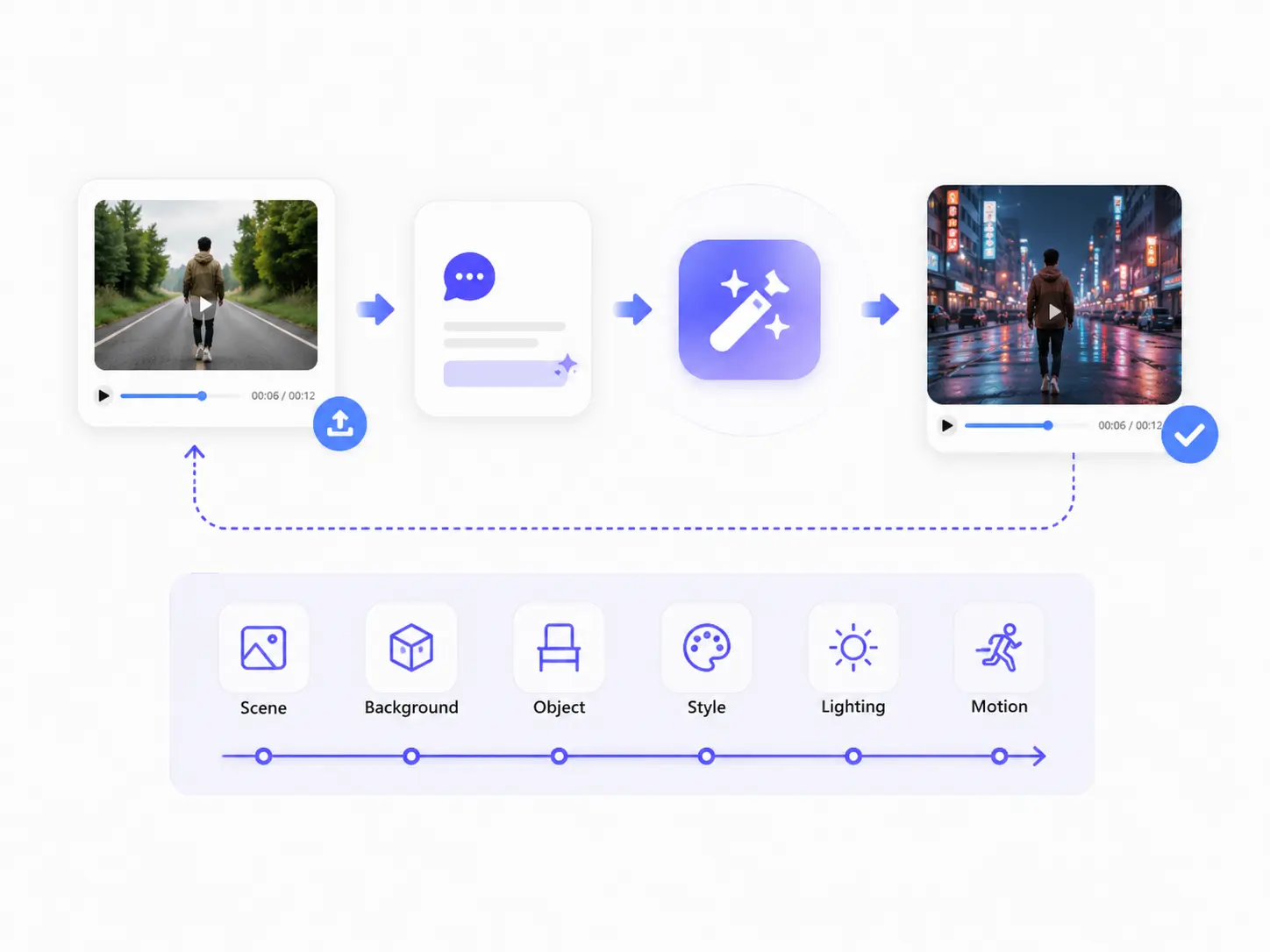
Upload a video, describe the edit, review the result, and adjust your prompt again. Happyhorse 1.0 makes it easier to refine scenes, styles, backgrounds, and visual details without complex manual editing.
Advanced features
When you need more control, use Happyhorse 1.0 to refine scenes, subjects, styles, motion, and audio-visual details.
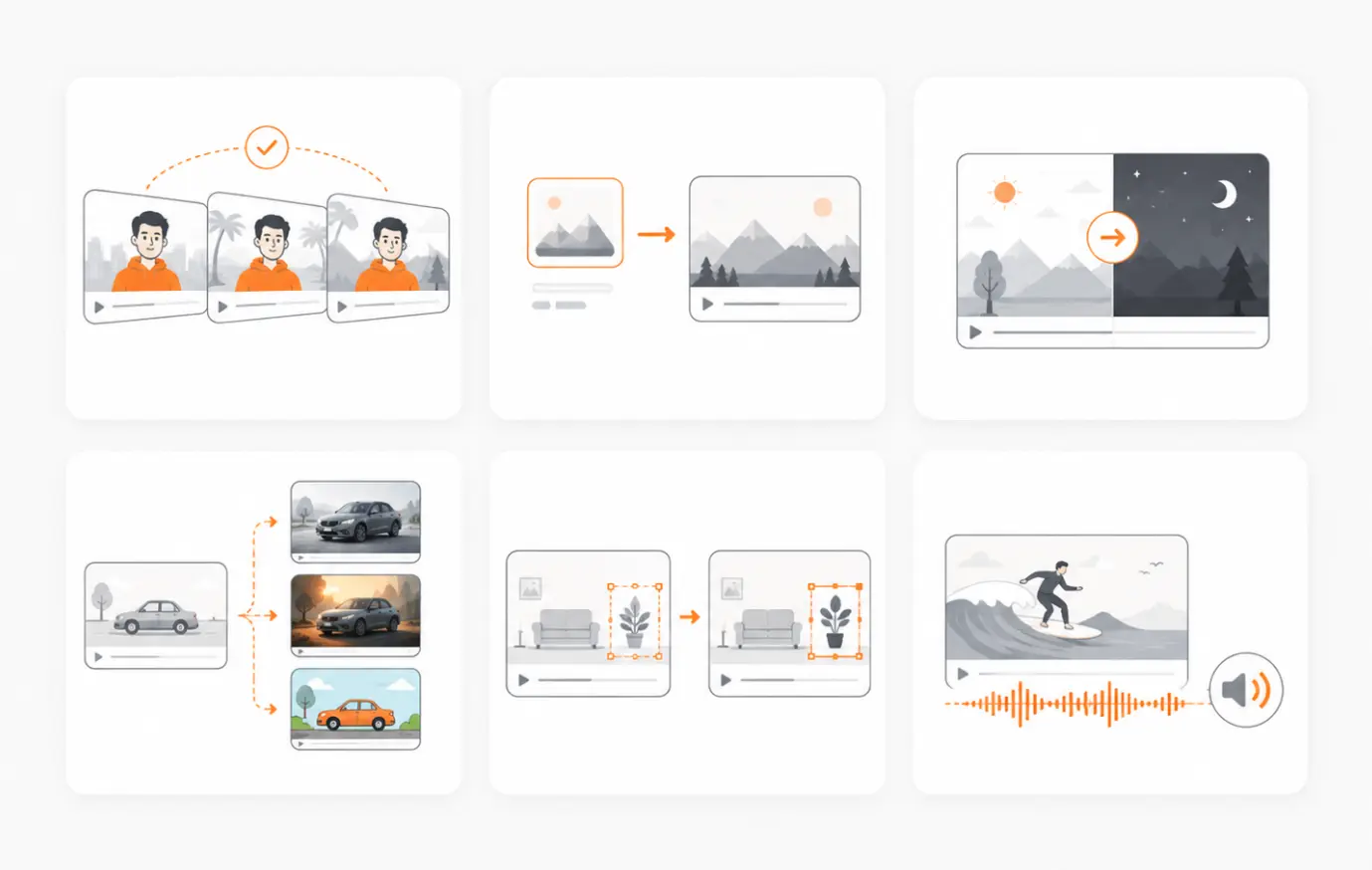
Subject consistency
Keep the main person, product, character, or object recognizable while changing the scene, background, lighting, or style.
Reference-guided editing
Use reference images to guide the subject look, outfit, product appearance, background, style, or final composition.
Scene recreation
Transform the original video into a new location, time of day, atmosphere, or environment while keeping the video flow natural.
Style control
Edit videos into cinematic, commercial, realistic, premium, animated, or social-media-ready styles.
Local visual changes
Modify selected details such as objects, props, outfits, product settings, lighting, background, or scene elements.
Audio-visual output
In supported workflows, create video edits with matching ambience, dialogue, sound effects, or more complete audio-visual results.
You May Also Like
FAQ
Happyhorse 1.0 video editing lets you upload a video and describe what you want to change. You can edit scenes, backgrounds, objects, styles, motion, and audio-visual details with simple prompts.
Edit Videos with Happyhorse 1.0
Upload your video, describe the change, and create a new version with updated scenes, subjects, style, motion, and audio-visual details.
Edit Video Now