

Use Nano Banana Pro to merge images into one
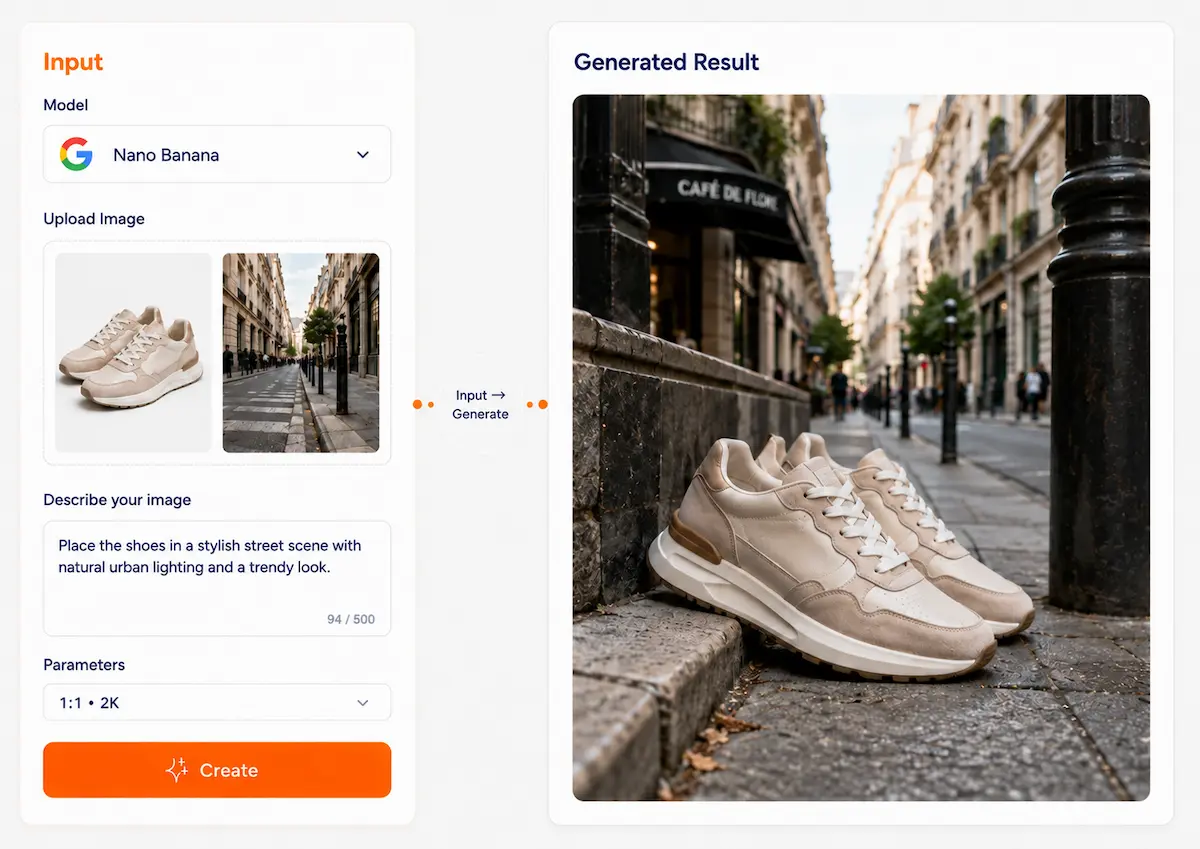
Upload multiple images and use Nano Banana Pro to create a clear and natural composite image. Combine people, products, backgrounds, clothing, and reference elements into one polished result, such as turning a dress and a street-style background into a fashion visual.
✨ Nano Banana pro Model
Create with multiple reference images, not just one prompt
Nano Banana pro on Dovoo AI helps you generate and edit images with multiple visual references in one workflow. Upload product shots, character photos, scene images, or style references, then describe the result you want. The model can mix up to 14 references in total, including up to 10 object references for high-fidelity detail and up to 4 character references for consistency.
Powered by Gemini 3.1 Flash Image for fast generation, multi-reference editing, clear text, and conversational iteration.
What can Nano Banana pro do with multiple references?
6 core capabilities for combining subjects, objects, scenes, style, and text in one image workflow
Multi-reference image generation
Combine multiple reference images in one workflow instead of relying on a single prompt. Use them together to guide subject, scene, style, and composition.
Character consistency
Use up to 4 character references to help keep people or characters recognizable across new scenes, poses, and outputs.
Object fidelity
Use up to 10 object references to preserve key product or object details when creating new marketing visuals, product-in-scene images, or mixed compositions.
Conversational image editing
Generate once, then continue refining through follow-up instructions. Ask for changes like background replacement, style adjustment, or added elements without restarting from zero.
Precise text and diagrams
Render clearer text inside images and create posters, marketing mockups, diagrams, and infographic-style visuals more reliably than a basic image model.
Grounded visual creation
Use real-world knowledge and search-grounded generation for subject-accurate visuals, labeled diagrams, and information-heavy image tasks.
Learn in 30 seconds
Two simple paths to start using multi-reference image workflows
Path A: Create from multiple references
- 1Select Nano Banana pro
- 2Write a prompt describing the final image
- 3Choose aspect ratio and style (optional)
- 4Make clear what each reference should contribute
- 5Generate and refine through follow-up instructions
Path B: Upload and edit with supporting references
- 1Upload the image you want to edit
- 2Add extra reference images if you want stronger consistency or fidelity
- 3Describe what to keep and what to change
- 4Generate the edited result
- 5Continue iterating until the image matches your goal
Break down the request
Subject + scene + style + what to change
Change less structure
For stability, edit local areas first, then the whole
Iterate step by step
Change 1–2 key points at a time for better results
Why use Nano Banana pro on Dovoo AI?
A simpler way to run multi-reference image creation and editing
One workflow for prompt + references
Bring your prompt and multiple images together in one place instead of splitting subject, scene, and style work across separate tools.
Fast iteration with Nano Banana pro
Nano Banana 2 is built for speed, making it easier to test multiple reference combinations and refine results quickly.
Easy switch between fast and Pro-quality paths
Start with Nano Banana 2 for speed and iteration, then move to Nano Banana Pro when you need more demanding instruction following or more text-heavy final assets.
Practical output for real use
Create multi-reference images for social media, ecommerce, ads, teaching visuals, and other everyday content workflows.
What is Nano Banana pro best for?
8 strong use cases for multi-reference image generation and editing
Product-in-scene visuals
- Combine a product image with background and lighting references to place products naturally into new scenes.
Multi-product compositions
- Bring several objects or products into one coherent image while keeping the important item details recognizable.
Character-based scene creation
- Use character or person references to create new posters
- portraits
- or story scenes with more consistent identity.
Brand poster and KV
- Use product
- style
- and layout references together to generate poster directions and campaign visuals.
Social media covers and creative posts
- Mix subject
- scene
- and style references to build eye-catching content for feeds
- covers
- and ads.
Infographics and labeled diagrams
- Turn notes
- concepts
- or structured information into clearer visual explanations with text and labels.
Style transfer with structure preserved
- Keep the core subject while borrowing the mood
- texture
- or visual language of another image.
Teaching materials and explainers
- Create diagrams
- handouts
- and concept visuals by combining content direction with reference-based visual guidance.
Real case studies
How multi-reference workflows can be used in practice
Product background replacement
Product photo + kitchen scene reference + soft lighting reference
A new product image placed naturally into the target scene
Same copy, 3 different design styles
Character scene transfer
2–4 character photos + café background reference
A new portrait or poster scene using the same character identity
Remove background clutter, watermarks
Brand poster composition
Product image + color/style reference + layout direction
A poster-style marketing image
16:9 banner, social cover in one click
Reference-based infographic
Short notes + visual reference direction
A labeled infographic or teaching visual
Prompt presets (ready to copy)
4 practical presets for multi-reference workflows
Combine multiple references
Use image A as the main subject, image B as the background, image C as the style reference, and image D as the composition guide. Create one coherent image that keeps the main subject recognizable.
Use this presetPut product into a new scene
Keep the product from image A unchanged. Place it into the environment of image B. Follow the lighting mood of image C. Make the final result look natural and ad-ready.
Use this presetKeep character consistent
Use images A, B, and C as character references. Create a new scene based on image D. Keep the character recognizable while changing pose, outfit context, or background.
Use this presetCreate a diagram with references
Use the notes below as the content source and image A as the visual style reference. Generate a clean diagram with clear labels and readable text.
Use this presetNano Banana 2 vs Pro—how to choose?
Pick the right model for your task
⚡ Nano Banana 2
Faster, more efficient for multi-reference workflows
- Optimized for speed and high-volume use
- Good balance of quality, cost, and latency
- Strong choice for reference-based generation and editing
- Useful for fast iteration, testing directions, and everyday creative production
- Best for:
- Optimized for speed and high-volume use Good balance of quality, cost, and latency Strong choice for reference-based generation and editing Useful for fast iteration, testing directions, and everyday creative production Best for product scenes, social creatives, concept visuals, and repeatable multi-reference tasks Right Column
- social creatives
- concept visuals
- repeatable multi-reference tasks
👑 Nano Banana Pro
Stronger for complex instructions and professional final assets
- Designed for professional asset production
- Better suited to more demanding instruction following
- Stronger fit for text-heavy layouts and polished final delivery
- Better choice when you need more complex multi-turn creation tasks
- Best for:
- final marketing assets
- structured diagrams
- clear text-heavy visuals
- high-fidelity professional output
Honest truth
Understanding Nano Banana 2’s boundaries in multi-reference work
Generative model behavior
Even with multiple references, some details may shift, simplify, or be interpreted differently. Clear prompts and clear reference roles improve stability.
Fact and label review is still needed
The model is useful for infographics and diagrams, but factual details, numbers, and labels should always be checked before publishing.
AI identification and compliance
Generated images include SynthID identification. Use images of people, brands, products, and copyrighted material responsibly and in line with applicable policies and laws.
How to use Nano Banana pro on Dovoo AI?
6-step quick start for multi-reference image creation
Select model
Choose Nano Banana pro for fast multi-reference generation and editing.
Enter your goal
Write a prompt describing the final result you want.
Upload reference images
Add subject, object, background, style, or composition references depending on the task.
Define priorities
Tell the model what to preserve, what to replace, and what each reference should guide.
Generate and refine
Create the first result, then continue editing through follow-up instructions.
Download the best version
Save the result once the subject, scene, and details are aligned with your intent.
Common issues
Q: Why does the subject drift?
A: Use clearer character references, reduce the number of simultaneous changes, and say explicitly what must stay unchanged.
Q: Why does the product detail look off?
A: Use cleaner object references and focus on the most important product angles or details first.
Q: Why is the text still not ideal?
A: Keep the copy shorter and simpler. For text-heavy or professional final layouts, Nano Banana Pro may be the better fit.
Q: Why should I review infographic results?
A: Because diagrams and fact-based visuals can still contain incorrect labels or data interpretations.
FAQ
Nano Banana 2 can mix up to 14 reference images in one workflow. For Gemini 3.1 Flash Image, this includes up to 10 object references for higher-fidelity object detail and up to 4 character references for consistency.
Start your multi-reference image workflow
Use Nano Banana pro to combine subjects, objects, scenes, and styles in one image workflow—fast enough for iteration, capable enough for real creative production.
Start creating