Upload an image and transform it with Nano Banana
Upload your image, describe how you want to change it, and use Nano Banana to create fast, expressive visuals for image style transfer, photo quality and lighting upgrade, interior and room redesign, and poster, banner, or cover redesign.
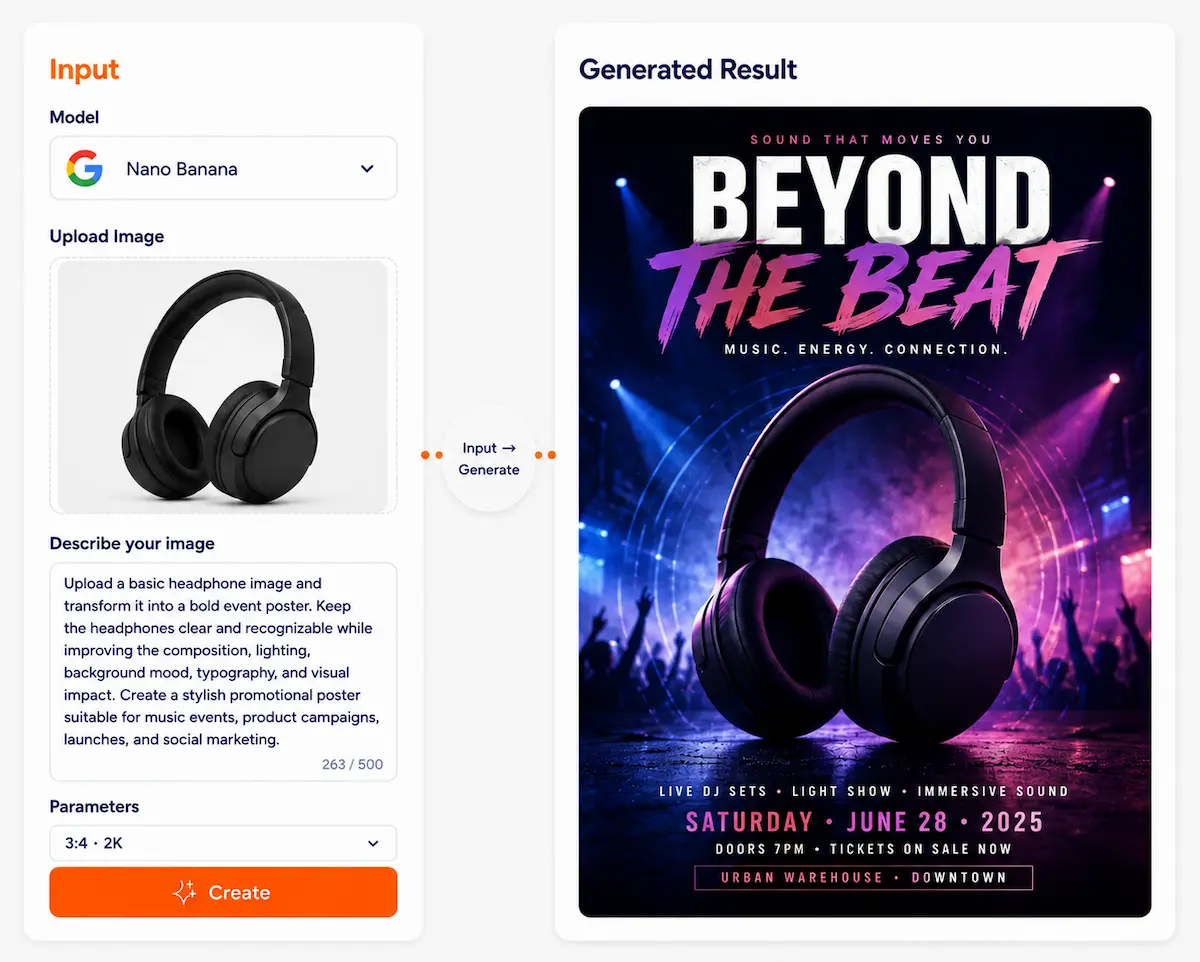
✨ Nano Banana Model
Generate images with one sentence, edit any image you upload
Google Gemini native image generation and editing is now on Dovoo AI. Supports text-to-image, image editing, inpainting, outpainting, conversational iteration—turning creation into play.
10,000+ creators already using
What can Nano Banana do?
6 core capabilities covering the full workflow from generation to editing
Text to image
Basic Describe in one sentence, AI generates posters, illustrations, and scene images for you
Image editing
Core Upload photos or artwork, change style, background, or add elements with one sentence
Inpainting
Advanced Precise edits: edit exactly where you brush—clothes, face, text all supported
Outpainting
Creative Extend the frame outward for banners, covers, and panoramic images
Multi-variant output
Batch 4–8 directions per concept for A/B testing
Infographics & text
Pro strength Generate clear charts, diagrams, handouts—Pro model excels
Learn in 30 seconds
Two shortest paths to get started
Path A: Text to image
- 1Select model (Nano Banana 2 or Pro)
- 2Enter a one-sentence description
- 3Choose aspect ratio and style (optional)
- 4Click generate, wait for AI output
- 5Refine via conversation until satisfied
Path B: Upload and edit
- 1Upload your image or product photo
- 2Describe what to change in one sentence
- 3Optional: brush region for inpainting
- 4Click generate, AI edits for you
- 5Iterate until perfect
Break down the request
Subject + scene + style + what to change
Change less structure
For stability, edit local areas first, then the whole
Iterate step by step
Change 1–2 key points at a time for better results
Why is Nano Banana on Dovoo AI more convenient?
Not just a model—a complete creation platform
Multi-model comparison
Compare the same image across Nano Banana, DALL-E, Midjourney and more—pick the best result
Unified version control
Roll back iterations, copy prompts, build your own "creative library"
Work management and reuse
Save reusable prompts and styles as templates for one-click reuse
Social media size presets
One-click 1:1, 4:5, 9:16, 16:9 and more—no cropping hassle
What is Nano Banana best for?
8 scenarios—click to see real cases
E-commerce main image and detail page
Brand poster and KV
Social media cover and images
Product background replacement
Avatar and portrait retouching
Infographics and diagrams
App illustrations and icons
Teaching materials and handouts
Real case studies
See how others use Nano Banana
Product background replacement
Original product image
Generated result
Keep product unchanged, swap 5 different scenes
Poster style swap
Original copy
Multi-style output
Same copy, 3 different design styles
Local removal
Original image
Cleaned
Remove background clutter, watermarks
Outpainting for banner
Original size
Outpainted
16:9 banner, social cover in one click
Prompt presets (ready to copy)
5 common presets, one-click to fill
Generate poster
Subject + scene + style + aspect + details Example: Red sports car + city night + cyberpunk + 16:9 + neon lights
Use this presetChange background
Keep subject + new background + lighting match Example: Keep coffee cup + beach scene + sunset lighting
Use this presetInpainting
In [area] change A to B + keep rest Example: In [clothes] change black to red + keep face and background
Use this presetCreate variant
Keep composition + change color/material/mood Example: Keep composition + oil painting style + warm tone
Use this presetNano Banana vs Pro—how to choose?
Pick the right model for your task
⚡ Nano Banana
Faster, more efficient
- Fast API response, for high-frequency output
- Batch iteration friendly
- Try multiple directions quickly, low cost
- Quick prototyping
- Social content, fast creative validation
- Best for:
- Social content batch generation
- Multi-direction creative testing
- Quick prototyping and iteration
- Daily images and illustrations
- Cost-sensitive projects
👑 Nano Banana Pro
Stronger instruction following
- Complex needs, high-detail accuracy
- Clear text and layout
- Infographics, in-image text, structured content
- Professional asset output
- High fidelity, ready for final delivery
- Best for:
- Infographic and diagram generation
- Complex instructions and details
- Brand assets and high-fidelity output
- In-image clear text
- Professional final delivery
Honest truth
Understanding Nano Banana's boundaries
Generative model behavior
Some details may be inaccurate or unexpected. Iterate and refine to improve.
Watermarks and labels
Outputs may include AI markers (SynthID or visible watermarks), depending on product policy.
Compliance
Use of people, brands, or copyrighted material must comply with applicable laws. Do not use for infringing purposes.
How to use on Dovoo AI?
6-step quick start
Select model
Nano Banana 2 or Pro
Select mode
"Generate" or "Edit"
Enter content
Prompt or upload image
Set parameters
Aspect ratio, count, style, etc.
Generate and refine
Click generate, iterate via conversation
Download and save
Save to workspace or local
Common issues
Q: Why did the subject deform?
A: Too many edits at once. Edit local areas first, then the whole; change less structure.
Q: Why is the text unclear?
A: Model 2 is less sensitive to text. Try Pro or simplify layout.
Q: Why is generation slow?
A: Pro is more complex; slightly slower is normal. Use 2 for speed.
FAQ
2 is faster and cheaper for batch; Pro is smarter and more precise for complex needs and infographics.
Ready?
Start your AI creation journey No complex learning—3 seconds to understand, 30 seconds to start, 3 minutes to your first image.
Start creating