

Turn images into social media AI videos with HappyHorse 1.0
Upload an image, describe the motion you want, and use HappyHorse 1.0 to create short AI videos for TikTok, Reels, and Shorts. For example, turn a product photo into a TikTok product video.
Just describe it, and Happy Horse 1.0 generates the complete video
A beginner-friendly AI video generation model for creating short videos from simple descriptions, images, or creative ideas. No complex prompt writing required.
Why suitable for beginners
Don’t know how to write prompts
Happy Horse 1.0 can understand plain language. You can describe the subject, scene, action, and mood in a normal sentence, and the model will turn it into a usable video result.
Afraid of imperfect descriptions
The model has strong tolerance for simple or incomplete ideas. Even if the first description is not perfect, small word changes can help move the result closer to what you want.
Don’t know which video model to choose
When you are not sure where to start, Happy Horse 1.0 is a practical entry model for common short video needs, including social clips, product videos, talking characters, and creative scenes.
Want to create results quickly
You do not need to plan a full production workflow first. Start with one sentence, generate a video, then adjust the wording, style, subject, or action based on the result.
What can Happy Horse 1.0 do
Social media content
- Short videos
- Reels and Shorts
- Fun clips
- Daily creative posts
- Story-style content
Advertising visuals
- Product promotion
- Brand marketing
- Short ad clips
- Campaign variations
- Visual hooks
Talking character videos
- Dialogue-driven clips
- Character expression
- Lip-sync style videos
- Virtual presenter content
- Product recommendation videos
Product display
- E-commerce videos
- Product showcase
- Demo clips
- Lifestyle product scenes
- Commercial presentation
Creative concept shorts
- Experimental ideas
- Fantasy scenes
- Cinematic moments
- Visual storytelling
- Mood-based videos
Style creation
- Realistic style
- Cinematic style
- Advertising style
- Illustration-inspired scenes
- Social media aesthetics
Capability showcase
Example 1: Social media content
“A girl sitting in a cozy cafe, warm lighting, reading a book”
Subject: a girl Location: cozy cafe Action: reading a book Atmosphere: warm lighting Video direction: calm, social-media-friendly lifestyle scene
A complete short video with a stable scene, clear subject, warm atmosphere, and natural everyday storytelling.

Example 2: Product display
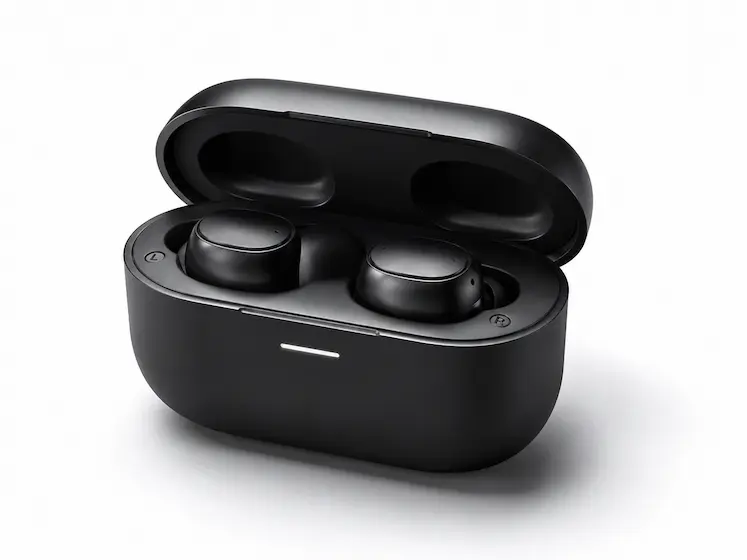
“A modern wireless earbud case on a white background, soft lighting, elegant product display”
Subject: wireless earbud case Background: clean white studio setting Lighting: soft commercial lighting Style: elegant product presentation Purpose: e-commerce or advertising use
A clean product video with clear details, commercial lighting, and a polished display style suitable for product pages, ads, and social posts.
Example 3: Talking character video
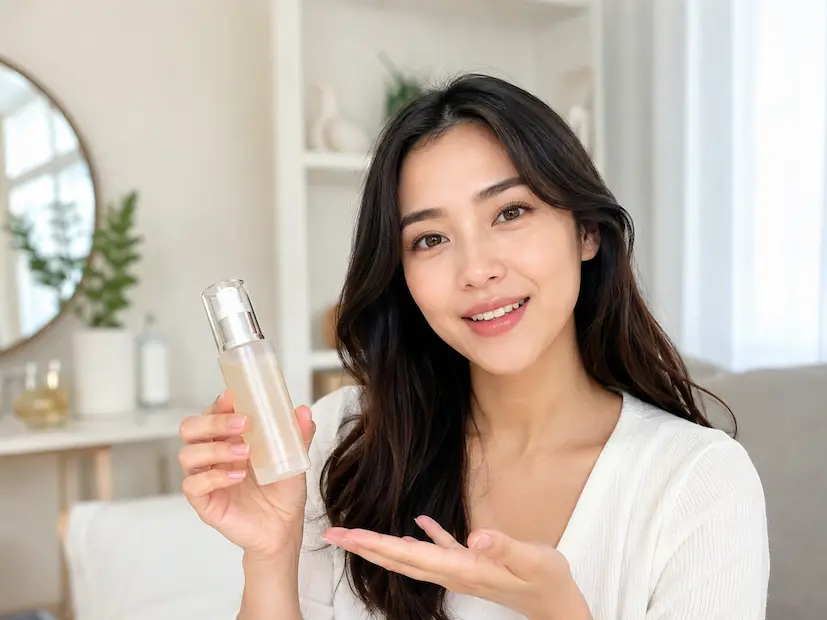
“A friendly woman explaining a new skincare product in a bright room, natural smile, soft voice”
Character: friendly woman Action: explaining a product Scene: bright room Expression: natural smile Audio direction: soft voice Use case: talking video, product recommendation, social ad
A short presenter-style video with character expression, dialogue-driven delivery, and audio-video synchronization.
How to write descriptions
One-sentence formula
Subject
Who or what appears in the video Examples: a person, a product, a character, a pet, a car, a room, a city street
Where
The location, background, or environment Examples: cafe, studio, beach, office, bedroom, white background, city street
What is happening
The main action, behavior, movement, or expression Examples: walking, smiling, talking, holding a product, opening a box, reading, waving
Atmosphere
Lighting, mood, style, or visual feeling Examples: warm lighting, cinematic, realistic, luxury, calm, energetic, soft sunlight
Examples
"“A kitten sleeping on the windowsill, sunlight streaming in, very quiet”"
"“A girl walking by the sea, wind blowing her hair, warm sunset”"
"“A luxury perfume bottle on a black table, soft spotlight, elegant advertising style”"
"“A young man talking to the camera in a modern office, friendly expression, natural voice”"
"“A backpack placed on a mountain trail, morning fog, outdoor lifestyle style”"
Best practices
Do not put too many unrelated requirements into one sentence. A clear subject, scene, action, and mood usually works better.
Use concrete words instead of abstract words. Instead of writing “beautiful room,” write “bright room, wooden table, white curtains, soft sunlight.”
If the result is close but not perfect, change one or two words. For example, change “walk” to “stroll,” “room” to “bright room,” or “happy” to “gentle smile.”
Start with a basic description first. After seeing the result, add more details such as camera movement, product style, character emotion, or lighting.
One-click preset effects
Don’t want to write from scratch? Select a preset, adjust a few words, and generate a video faster.
Explanation template
Tutorials, demos, instructions, product explanations, educational videos.Example Prompt “A friendly presenter explains how to use a new app in a bright office, natural voice, clear demonstration”
Use templateDisplay template
Products, gifts, introductions, e-commerce showcases, commercial display videos.Example Prompt “A modern product on a clean studio background, soft lighting, slow camera movement, elegant advertising style”
Use templateGesture template
Waving, pointing, smiling, reacting, talking, simple character actions.Example Prompt “A cheerful person waves to the camera in a cozy room, friendly smile, warm lighting”
Use templateEntrance template
Entering, appearing, walking into frame, scene reveal, opening moments.Example Prompt “A person walks into a modern studio and looks at the camera, cinematic lighting, confident mood”
Use templateTransition template
Scene switching, before-and-after changes, product transformation, creative transitions.Example Prompt “A plain product scene smoothly changes into a polished advertising scene, clean transition, bright lighting”
Use templateMore templates
Browse all preset templates for social videos, ads, product displays, talking characters, and creative scenes.
Use templateCreative workflow
Simple iteration helps you move closer to the desired result.
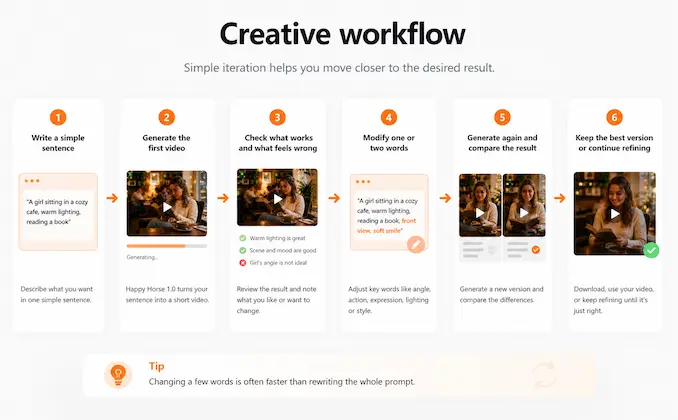
Happy Horse 1.0 is not about getting a perfect video from the first sentence. It is designed for fast creative iteration. Write one sentence, generate a result, then adjust the subject, action, style, lighting, or mood based on what you see.
Advanced features
After you are familiar with the basics, try these advanced capabilities for more controlled video creation.
Multi-subject scenes
Generate videos with multiple people, objects, or visual elements in the same scene while trying to keep the main composition understandable. Best for Group scenes, product-and-person videos, lifestyle ads, multi-object displays
Style control
Specify the visual style of the video, such as realistic, cinematic, advertising, anime-inspired, illustration, luxury, or social media style. Best for Brand visuals, creative campaigns, social clips, aesthetic experiments
Atmosphere enhancement
Strengthen the emotional feeling of the video through lighting, environment, color tone, weather, background details, and mood. Best for Cinematic scenes, lifestyle videos, emotional storytelling, product atmosphere
Continuous segments
Create related short clips with similar subjects, styles, or scene directions, then use them as building blocks for a longer creative workflow. Best for Ad sequences, storyboards, campaign variations, multi-scene social videos
Local redo
When the overall direction is good, adjust only the part that feels wrong by changing specific words related to action, expression, lighting, or scene details. Best for Prompt refinement, version testing, improving near-successful results
Precise control
Use more detailed descriptions to control subject appearance, action, camera direction, lighting, style, mood, and intended use case. Best for Commercial videos, product ads, character videos, campaign-ready creative assets
FAQ
Yes. Happy Horse 1.0 is suitable for short advertising clips, product showcases, social ads, talking character videos, and campaign concept testing.
No need to learn prompts to start creating
Just write a sentence, choose a preset, or upload an idea, and Happy Horse 1.0 can help you generate a usable short video.
Start creating